
A firestick is the cheapest way to turn any television in your house into a proper iptv firestick streaming machine. Plug it into the HDMI port, get it on the Wi-Fi, and a screen that yesterday could only show terrestrial channels suddenly has thousands of live channels, a deep on-demand library, and full UK catch-up running through it.
That is the appeal in a nutshell. The hardware costs almost nothing. It works on any TV with an HDMI port. Set up properly, it does pretty much everything a much pricier smart TV does, and often with a less cluttered interface.
What follows is the whole thing from the start. What an iptv firestick setup actually is, why it has become the default for so many UK homes, how to install IPTV on a firestick step by step, which player apps are worth bothering with, what tends to go wrong, and how to keep the whole thing humming along long-term.
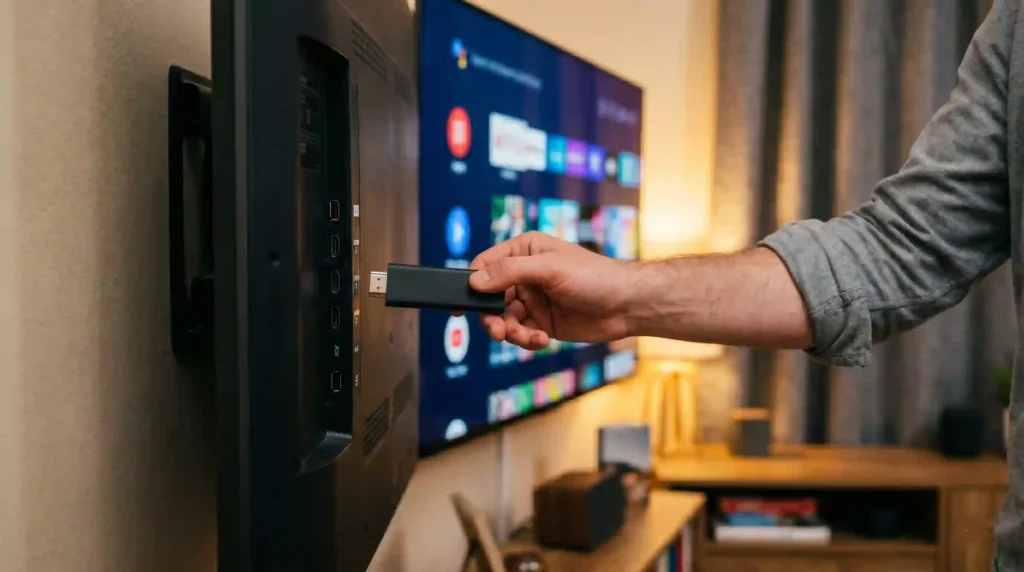
What Is A Firestick And Why Does It Pair So Well With IPTV Firestick Setups?
A firestick is a small device, about the size of a memory stick, that plugs into the HDMI port on the back of any television. It runs a streaming operating system and pulls content from the internet rather than from an aerial or a satellite dish. The technology underneath is the same as any other internet streaming service, covered properly in this overview of internet protocol television for anyone wanting the technical detail.
Three reasons it has quietly become the default IPTV device in UK homes:
Cost. A firestick is cheap. Compared to buying a new smart TV or a dedicated set-top box, it is by far the lowest-cost route into an iptv firestick setup. A lot of households already own one for other streaming services and never realised it could do this.
Flexibility. The firestick is not locked down to a single app store the way some smart TVs are. You can install iptv firestick player apps from outside the official store using a process called sideloading. Sounds technical, takes about five minutes the first time.
Portability. Take it on holiday, take it to your parents, take it to a friend’s place. It is small enough to live in a coat pocket, and your iptv firestick login works wherever you plug it in next.
What You Actually Need Before You Start Your IPTV Firestick Setup
Get these four things lined up first. Saves a lot of stop-start later.
- A firestick. Any generation works. The newer 4K models stream higher resolution, but even an older basic one handles a standard iptv firestick setup without complaint.
- A working internet connection. Wi-Fi is fine for catch-up and on-demand. For live sport, a wired connection is better, though firesticks do not come with an ethernet port. There is an adapter for under a tenner if reliability really matters.
- An IPTV subscription. This is what actually supplies the channels. Without it, the player app on your firestick has nothing to display. Sort yours at the free trial page before you start any of this.
- About fifteen minutes. That is genuinely how long the whole setup takes once you know what you are doing.
How To Install IPTV On A Firestick — Step By Step
People overthink this part. Honestly, it is just five steps in order, and it is not as technical as the YouTube tutorials make it look.
Step one — enable apps from unknown sources. On your firestick home screen, head to Settings → My Fire TV → Developer Options → Install Unknown Apps. Find the browser or downloader app you plan to use and toggle it on. Without this single setting switched on, the iptv firestick player apps that live outside the official store simply will not install. Worth getting right first time.
Step two — install a sideloader. Search the firestick app store for a downloader app and install it. That is the tool that brings iptv firestick player apps onto the device. Thirty seconds, free, and you only have to do it once.
Step three — install your IPTV player. Open the downloader and enter the URL of the player you want. A popular choice with iptv firestick users is IPTV Smarters, which handles M3U playlists, has a clean interface, and runs smoothly on every firestick generation. The download installs automatically once you confirm. This is the part of the iptv firestick setup most people are nervous about, and honestly it is the easiest step of the lot.
Step four — enter your subscription details. Open the newly installed player. Choose whether to log in via M3U URL or Xtream Codes API, depending on what your provider sent over. Paste in the server URL, username, and password from your subscription welcome email. The channel list and programme guide populate within a few minutes.
Step five — set favourites and you are done. Browse the channel list, mark your regulars as favourites, and they will sit at the top of the list every time you open the app. Total iptv firestick setup time, first try: about ten minutes.
Choosing The Right IPTV Firestick Player App
A handful of iptv firestick player apps are worth considering, and the right one really depends on what you watch. Here is what to weigh up before picking:
| Feature | Why It Matters |
|---|---|
| M3U + Xtream Codes support | The two main subscription formats — your player must handle both |
| EPG support | Without a programme guide, you are scrolling through unlabelled streams |
| Catch-up integration | Lets you scroll back through recent broadcasts within the app |
| Multi-screen handling | Works alongside your other devices on the same subscription |
| Parental controls | Useful if children use the same firestick |
| Regular updates | A maintained app gets new features and bug fixes |
Free open-source players cover the basics fine. Paid ones add polish, faster interfaces, and better catch-up navigation. For a typical iptv firestick household, a free player is usually enough to get going, and you can always upgrade later if something specific starts annoying you.
Getting The Most Out Of Your Firestick Setup
A few small things that genuinely improve the iptv firestick experience, most of them free or close to it. These are the upgrades that turn an average setup into one that actually holds up.
Restart the firestick weekly. A quick unplug-and-replug clears the device cache and stops minor performance issues building up over time. Thirty seconds.
Use a wired connection for sport. As mentioned, firesticks have no ethernet built in. A small USB-to-ethernet adapter sorts it for under ten pounds and makes a real difference during live football, where Wi-Fi instability is the main cause of stream freezing.
Keep the firestick cool. It runs warm by design, especially through long live streams. If yours sits behind a TV with no airflow, a basic HDMI extender cable that pulls it a few inches into the open prevents heat-related slowdowns.
Keep the player app updated. Most players push updates pretty regularly. Outdated versions can develop EPG sync issues or playback bugs the newer release has already fixed.
Use a wired remote backup. The voice remote that comes with the firestick is great, but the batteries always die at the worst moment. A spare set in the drawer saves the inevitable Saturday afternoon scramble.
What An IPTV Firestick Subscription Costs
The firestick itself is a one-off purchase. The IPTV subscription is the ongoing cost, and crucially, the firestick has no effect on what you pay for the service. The same plan runs across smart TVs, phones, tablets, and computers at the same price.
| Plan Length | Typical Price | Per Month |
|---|---|---|
| 1 Month | £10–£20 | £10–£20 |
| 3 Months | £20–£40 | £7–£13 |
| 6 Months | £30–£55 | £5–£9 |
| 12 Months | £50–£90 | £4–£7 |
Smart move is the free trial first. Install the player on your firestick, run the trial through a proper busy evening, check the catch-up works, and only then pick a plan. Once you know the iptv firestick setup is solid, longer plans bring the monthly cost down a lot. The full range is on the subscription plans page.
Is Using IPTV Firestick Legal In The UK?
Short answer. Yes, when the provider is licenced.
The firestick is just hardware. Plugging it into your TV is legal. Running streaming apps on it is legal. What actually matters is the service supplying the content. A licenced iptv firestick provider holding the right content distribution licences is perfectly legal to subscribe to and use in the UK. Get British IPTV operates as a licenced service, so the full setup, hardware plus subscription, sits comfortably on the right side of the line.
Unlicensed services are a different conversation, and they tend to be the worst on the market for reliability in any case. Cheap is rarely cheap when it crashes during the only match you cared about all week.
Common IPTV Firestick Problems And How To Fix Them
A few of the issues firestick IPTV users hit most often, with the fixes that actually work.
Stream keeps buffering on live sport. Almost always a network problem on your side. Restart the router, switch to ethernet via a USB adapter, or move the firestick closer to where the router lives. If buffering only happens during peak hours, the provider’s server may be the culprit, in which case test the same channel during a quiet time to confirm.
EPG not loading. Give it ten to fifteen minutes after the first install. If it has still not loaded by then, force-close the player and reopen it. Most EPGs populate fully on the second launch.
Player crashes when opening certain channels. Usually an outdated player. Update it to the latest version. If the problem only happens on one specific channel, the source feed may be temporarily down. Try again later.
Firestick has frozen completely. Hold play and select together for ten seconds to force restart. Works almost every time. If it does not, unplug the device from the wall for thirty seconds and plug it back in.
IPTV Firestick — Frequently Asked Questions
Can IPTV work on firestick? Yes. The firestick is one of the most popular devices for running IPTV in the UK. Cheap, portable, and it supports sideloading the player apps the main app store does not always carry. Setup from scratch takes about fifteen minutes.
Can you get IPTV Smarters on firestick? Yes. IPTV Smarters is one of the most widely used players for iptv firestick setups. It is not in the standard firestick app store, so you install it by sideloading via a downloader app, which takes a couple of minutes. Once it is on the device, you log in using either the M3U URL or the Xtream Codes details from your subscription provider.
How to download IPTV firestick? You do not actually download “IPTV” itself. You download a player app onto the firestick and then connect it to your IPTV subscription. The standard process: enable installs from unknown sources, install a downloader app from the firestick store, use it to install your chosen IPTV player, then drop your subscription credentials into the player.
How to get IPTV firestick? Three things needed. A firestick (any generation), an IPTV subscription from a licenced provider such as the free trial at Get British IPTV, and a player app installed on the device. Follow the five-step installation guide above and you will be watching within fifteen minutes.
How to search on IPTV firestick? Most player apps have a search function built in, usually behind a magnifying glass icon on the main menu. Enter the channel name or programme title using the on-screen keyboard or the firestick voice remote. Some players also let you search the EPG by genre or broadcast time, which is handy for tracking down specific live events.
How to record on IPTV firestick? Recording features vary between players. Some have a built-in record function that saves a programme directly to your firestick’s storage. Others lean on the catch-up feature instead, which is usually more reliable because it works on the provider’s servers rather than your local device. On a firestick specifically, catch-up is the better route, since the device has limited storage anyway.
What is the best IPTV service for UK users? Stability, full UK channel coverage, and a long catch-up window are what decide it. Get British IPTV is built around those three and works seamlessly on firestick hardware. Start with the free trial and test it before paying anything.
How to set up a home internet television system? Subscribe to an IPTV service, install a compatible player on your device, drop your credentials in, and let the programme guide load. On a firestick the whole thing is about fifteen minutes. The subscription plans page covers the available options.
Are IPTV services legal? Services holding the correct content licences are, yes. The technology itself is what mainstream platforms use. The legal question is about the specific provider, not the delivery method.
Are IPTV subscriptions legal? A subscription to a properly licenced provider is legal and sits on the same footing as any other legitimate streaming service. Licenced versus unlicensed is the only line that matters.
Can IPTV work on a laptop? Yes. Free desktop players exist for both Windows and Mac. The same subscription works across a laptop, a firestick, a smart TV, or a phone interchangeably, no separate purchase needed.

A firestick plus a proper IPTV subscription is the cheapest, most flexible way to drag an ordinary television into the modern streaming era. The hardware barely costs anything. The iptv firestick setup is straightforward. The end result is genuinely better than most satellite contracts deliver, for a fraction of the monthly price.
Pop over to Get British IPTV, grab the free trial, and have the whole iptv firestick running before the weekend. Fifteen minutes of setup, and the television in your house finally works the way it should have done years ago.